
Find out where your store is losing money, in half an hour or less.
Send us your store’s URL and approve read-only access in your store. Our scan checks your checkout, speed, plugins and security, and emails you a report, in half an hour or less, with every issue ranked by what to fix first. You don’t need to share a login or install anything.
It’s free, and it takes half an hour or less.


Start your free Store Scan
Tell us where to look, then approve read-only access in your store. Your report arrives by email. It takes half an hour or less.
Next, you’ll approve read-only access in your store.
“Saucal superseded our expectations.”Leonardo Silva, CTO, Hello Mood
Trusted by teams at Amazon Pay, Stripe, Automattic, Facebook, Pinterest and Mastercard
Slow stores lose sales without anyone noticing
When stores get in touch with us, it’s usually because things have gotten slow. Pages take a few seconds too long to load, checkout drags during a campaign, or the admin crawls whenever someone processes orders.
The store is still up and orders are still coming in, so it’s easy to miss what that slowness costs you. The visitors who leave before a page loads never show up in your sales numbers.
Sound familiar?
- Pages take more than a couple of seconds to load on mobile
- Checkout slows down during sales or campaigns
- Search Console flags Core Web Vitals on your product pages
- The admin drags when you process orders or edit products
- Nobody can say which plugin or integration costs you the most time
Saucal is a WooCommerce-only agency
We’ve spent more than 15 years building, fixing and running WooCommerce stores, and every check in the scan comes from a problem we have fixed ourselves.

Results at speed
Leonardo Silva
CTO and head of Production,
Hello Mood


“
Saucal superseded our expectations, managing each aspect of the project to a level of detail which gave us the results we were looking for, at speed.”
This is for you if
A good fit
- You run WooCommerce and do roughly $1M or more a year online, or 50+ orders a day
- Slow pages or a clunky checkout cost you real revenue and you want to know how much
- You have a developer or agency who can act on a report and you need to point them at the right problems
- A big sale or Black Friday is coming and you want no surprises
Probably not yet
- Your store is still pre-launch
- You want a PageSpeed score rather than a diagnosis
- You need one known bug fixed today
What we look at
Most of what we check can be seen from where your customers stand, and the rest comes from the read-only access you approve. Our tooling does the measuring, grades each finding against published ranges and ranks them by what to fix first.

Checkout and cart
Where your store allows it, we add a test product to a cart and open the cart and checkout pages on desktop and mobile, to see what a shopper sees on the way to payment, then remove it again. We never place a real order.

Speed
Core Web Vitals and load times, tested on mobile and desktop for your home, category and product pages, along with the scripts and images that slow them down.

Plugins and update risk
Your plugins and their versions, checked for updates you are behind on and against published vulnerability databases.

Server and security basics
Server response time, image delivery, SSL and security headers, plus your PHP and object-cache setup.

Accessibility
Automated checks against the WCAG 2.1 A and AA rules on your home, product and cart pages, so you know whether shoppers using assistive technology can use your store.

What we can’t see
Order and customer details, background jobs, your database and your code are outside this scan, which only reads system status, monthly sales totals, failed-order counts and payment-gateway settings. The Performance Audit covers those.
How it works
Send us a few details, approve read-only access, and we take it from there.
Send your store URL
Give us your store’s URL and your work email, then approve read-only access in your own store, or paste a read-only API key. We don’t need a login or a plugin.
We scan your store
Our tooling measures all five areas, then ranks what it finds by impact. It takes half an hour or less, and you can close the page: we email the report.
Your results arrive
Your report arrives by email with a prioritised list of fixes. If you’d like to talk it through, you can book a 20-minute walkthrough, but that part is entirely optional.
Every finding comes with a fix
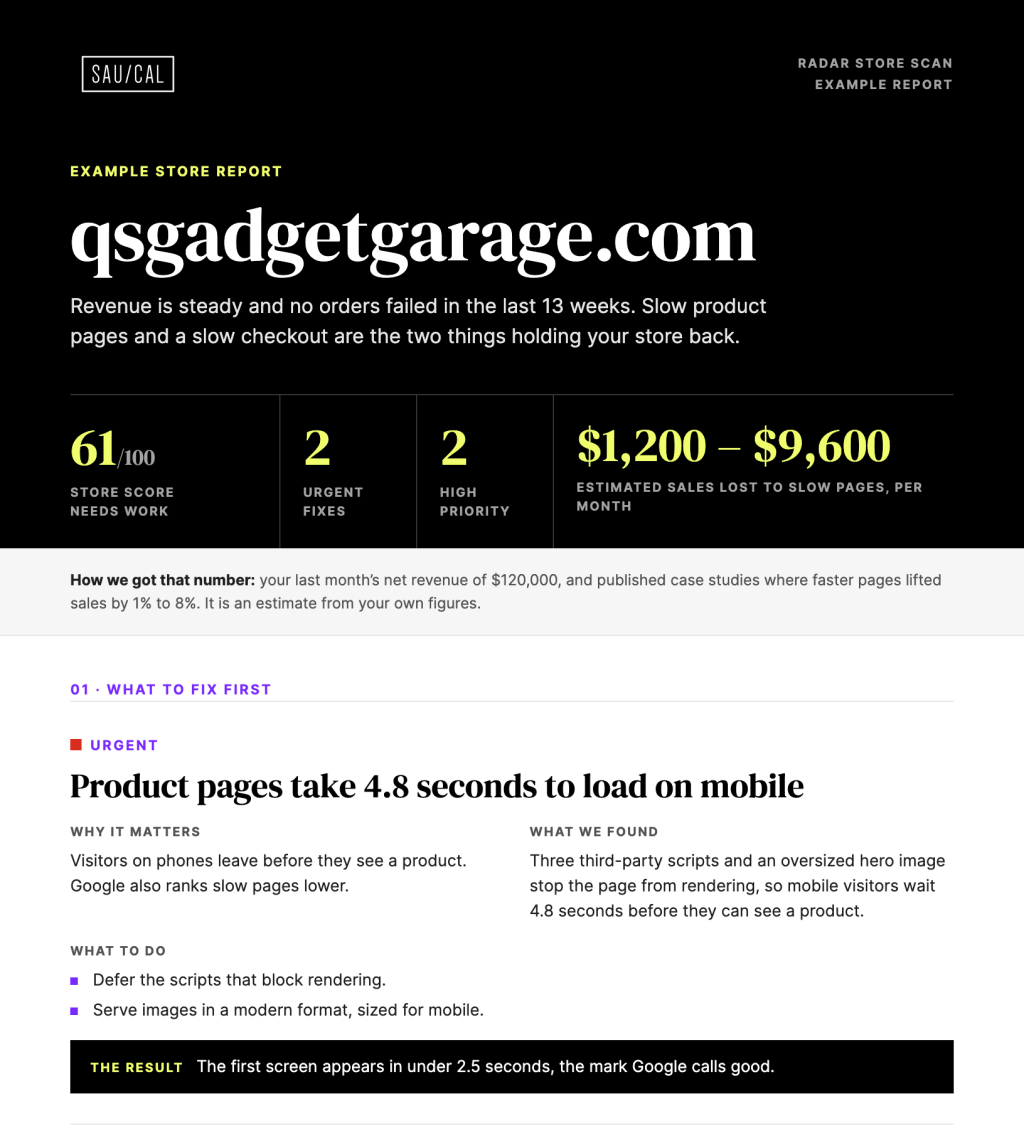
You won’t get a 90-page data dump. Each finding explains what’s wrong, what it’s likely costing you and how to fix it, written so that your team or your current developer can act on it without needing to call us.
Because we only get a limited, read-only view of your store, any cost figures are estimates based on your store’s data. The example on the right shows the format.
Start free, then go deeper
The Store Scan shows you what is wrong. The Performance Audit finds out why and writes the fix list. Maintenance keeps watching after that.
RADAR Store Scan
Free
What your customers run into today, ranked by what to fix first.
- Checkout tested on desktop and mobile
- Speed and Core Web Vitals
- Plugins checked for known vulnerabilities
- Server basics and security headers
Access needed: your store URL, plus read-only access you approve.
Scan my storeRADAR Performance Audit
$4,995 fixed fee
Takes everything the Store Scan found and traces each problem to its cause, with a fix list ranked by revenue. Implement the fixes as written and your store improves measurably, or we refund the audit fee.
- Every Store Scan finding, traced to its cause
- Code review of your theme and custom plugins
- Slow queries and server logs
- Hosting tested under real traffic
Access needed: read-only server and code access, on top of the scan’s. Questions first? Talk to us.
Add to cartMaintenance with RADAR Monitoring
Included with Maintenance
RADAR scans your store every day. When it catches a problem, AI suggests the fix on the fly, and an engineer reviews it before it goes live.
- Daily scans of your store
- AI suggests the fix as soon as a problem is caught
- An engineer reviews every fix before it goes live
Included in every Maintenance plan, no extra cost.
See MaintenanceThe report is yours, and what you do next is up to you
Plenty of stores fix everything with their own team. If the report points to something bigger, these are the two next steps.
Project Blueprint
A signed-off scope, budget and risk plan before you build or replatform. A good next step when the fix turns out to be a rebuild.
Talk to usManaged WooCommerce
Hosting built for checkout under load, with the migration included. A good next step when the Performance Audit shows your hosting is the bottleneck.
See Managed WooCommerceFrequently Asked Questions
Is the Store Scan really free?
Yes. Most stores we scan have at least one problem worth fixing, so we’d rather show you something useful than ask for a call first. Some stores never hire us, and that’s fine.
Do you need access to my store?
A little, and it is read-only. You approve it in your own store (the standard WooCommerce approval screen) or paste a read-only API key, and the scan reads system status, monthly sales totals and payment-gateway settings, never customer or order details. We don’t need a login, a plugin or admin access, and we never place a real order. You can revoke the access anytime under WooCommerce › Settings › Advanced › REST API.
What do you keep, and for how long?
Our copy of your key is encrypted and deleted as soon as the scan finishes, whether or not it succeeds. We keep the scan’s measurements and findings, plus a log of every call we made to your store. We don’t delete them on a timer. The key itself stays in your store until you revoke it, and you can do that anytime under WooCommerce › Settings › Advanced › REST API.
What can’t the scan see?
Anything behind the login, such as your real order and payment data, background jobs, the database, your code and most of your server settings. That’s why cost figures are estimates, and why the Performance Audit exists.
Will the scan slow down my store?
No. It makes about as many requests as a handful of shoppers browsing for a few minutes, and we won’t run any load testing without your permission.
How long does it take, and what if the report doesn’t arrive?
Your report arrives by email in half an hour or less, and you can close the page while you wait. If it hasn’t shown up after that, check your spam folder, then reply to the confirmation email and we’ll sort it out.
Does it work with my store?
It works with WooCommerce stores where you can approve read-only access or paste a read-only API key. Out-of-date stores can be scanned too, and the old versions show up in your report as findings. Agencies can scan a client’s store as long as the owner agrees. The report goes to the work email you enter, so use the address of whoever should read it.
How is this different from PageSpeed Insights or GTmetrix?
Those tools score the speed of a single page. The Store Scan also adds a test product to a cart and checks your checkout, checks your plugins against known vulnerabilities and reads your server and object-cache setup, and ranks the findings by what matters most and what to fix first.
Will you call me afterwards?
No. Your report arrives by email in half an hour or less, with a link to book a 20-minute walkthrough if you want one. We also follow up by email, and every email has an unsubscribe link.
What happens after I buy the Performance Audit?
After checkout you get an invite to a shared Slack channel with our team, and we book a kickoff call. You give us read-only access to your server and code, we run the audit, and we walk you through the findings on a delivery call. Not sure it’s the right fit? Talk to us first.
Find out where your store is losing money.
Black Friday is on November 27. A scan now leaves time to act on what we find.